
Skibidi Astro Tower Defense Summoning and Auto Sell Guide
Find your target on the active banner, set the rarities you want to keep, and spend Gold on summons.
Open Summon in the lobby and check the six active units and the Changes in timer. Turn off Auto Sell for your target’s rarity, then spend 100 Gold on one summon or 1,000 Gold on ten. A ten-pull requires ten free unit inventory slots, even with Auto Sell enabled.
Pull Costs and Inventory Space
| Option | Cost | Cost per pull |
|---|---|---|
| Summon 1 | 100 Gold | 100 Gold |
| Summon 10 | 1,000 Gold | 100 Gold |
Summons use your lobby Gold. Choose single pulls when you want fewer than ten; a ten-pull has the same price per unit and requires 1,000 Gold upfront. Before a ten-pull, make sure your unit inventory has at least ten empty slots. Auto Sell does not remove that requirement.
Find Your Target on the Banner
Open Summon from the left side of the lobby, or check the lobby summon board. The active banner has one unit in each of six rarity slots: Common, Rare, Epic, Legendary, Mythic, and Omega. Find your target by its full name and rarity, then read its percentage in the Summon menu for your active Luck setting.
The Changes in countdown tells you when the lineup changes. If your target is absent, wait for a lineup that includes it; check the name again before spending Gold.
For example, Upgraded Titan TV occupies the Legendary slot in several lineups. Titan TV Man (Astro Upgrade) and Titan TV Man (Astro) are separate names shown in Mythic slots, so read the full name when looking for a particular unit.
Set Auto Sell Before Pulling
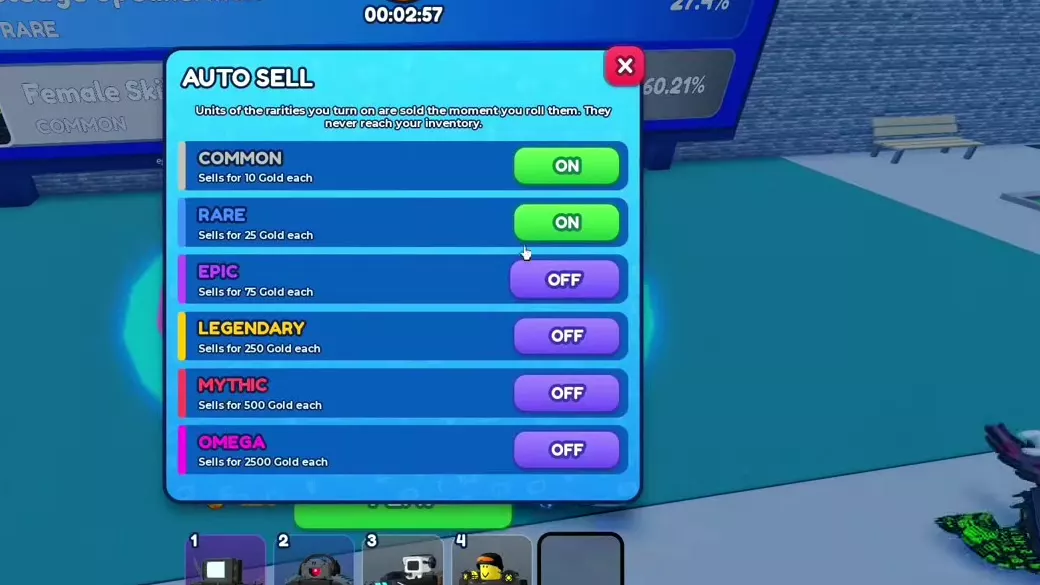
Open Auto Sell in Summon and check each of the six rarity switches. A unit drawn from an enabled rarity is sold immediately and does not enter your inventory. Leave the switch off for every rarity you want to keep. ON 2 or ON 3 counts the enabled rarities; open the settings to see which ones they are.
- To keep Legendary and higher units, turn on Common, Rare, and Epic, and leave Legendary, Mythic, and Omega off.
- To keep an Epic target, turn Epic off. You can still turn on Common and Rare.
Auto Sell returns Gold according to the unit’s rarity. For example, an auto-sold Epic returns 75 Gold, so a 100 Gold single summon costs 25 Gold net. See summon rates and Auto Sell returns for all six tiers.
Summon and Check Your Results
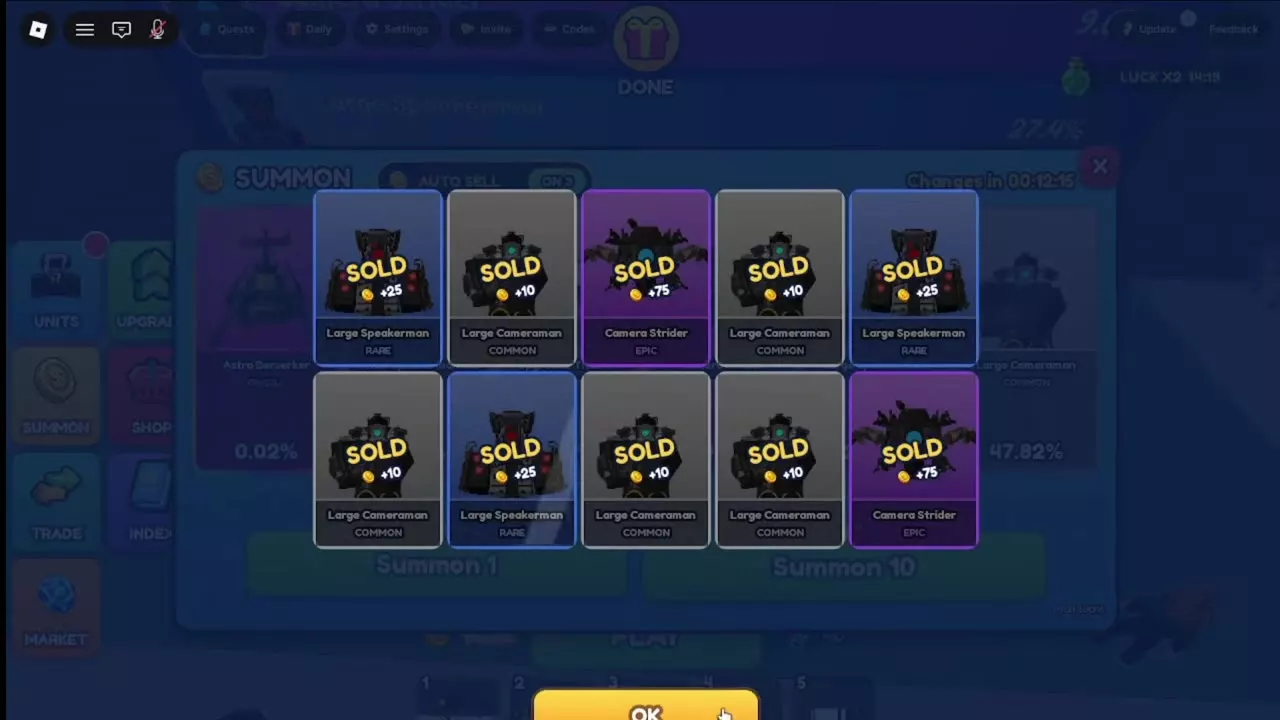
- Select Summon 1 or Summon 10. Tap anywhere during the reveal to skip the animation.
- Check the result cards. SOLD and the Gold amount identify an auto-sold unit and its return.
- Select OK to return to the banner. Find retained units in Units.
If Inventory Full blocks a ten-pull, select Open Units and free enough space to reach ten empty slots. In Units, select Sell Units, choose spare copies, review the count and Gold total, and confirm the sale. The sale is irreversible. Return to Summon once you have enough room; the inventory guide covers bulk selling and capacity.
Banner Rates and Named Unit Routes
- Compare rarity percentages under different Luck settings and browse saved lineups in Summon Rates.
- Look up named units and their acquisition routes in the unit list.
- Use a timed Luck item before pulling with the help of the boost guide.
- Search the Marketplace for an available named unit listing, or compare the units offered by Scientist and Injured Crates.