
Skibidi Astro Tower Defense Trading, Marketplace and Mailbox
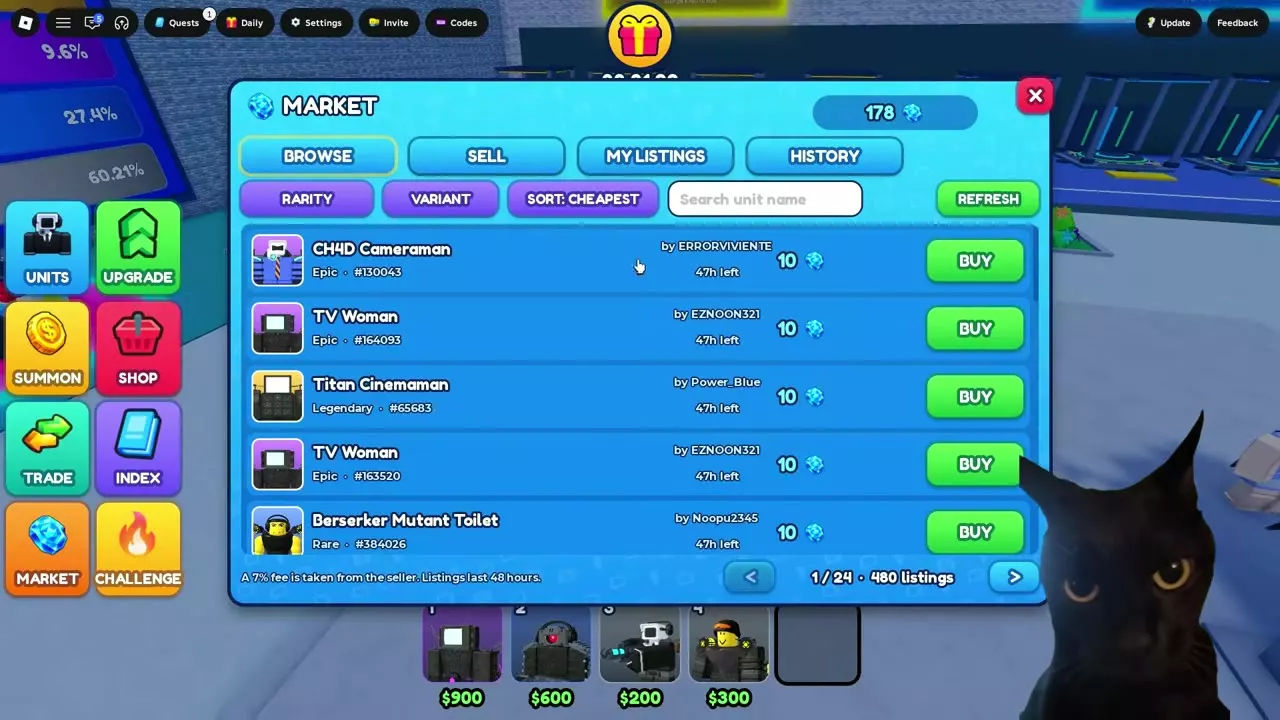
Choose the right lobby feature to buy or sell a unit, exchange with another player, or send a gift.
Use Market to buy or list a unit for Gems, Trade to exchange with an online player, and Mailbox to send gifts to an online or offline recipient.
Choose How to Move a Unit
- Market: Browse named unit listings or offer your own unit for Gems.
- Trade: Find an online player and send a direct exchange request.
- Mailbox: Send a unit, Gems, or Trait Shards as a gift, including to a player who is offline.
Market, Trade and Mailbox at a Glance
| Feature | Use | Key action |
|---|---|---|
| Market | Buy or sell for Gems | Claim after a sale |
| Trade | Exchange with a player | Find username; send request |
| Mailbox | Send units or resources | Claim All gifts |
Open Market from the lobby menu and use Browse to search listings. Sellers collect Gems with Claim in My Listings after a sale.
Open Trade in the lobby, find a player by username, and select Trade beside their name. An incoming request offers Accept and Decline. In Mailbox, Claim All collects waiting gifts.
Conditions That Affect the Choice
- Market prices: A unit card's Gems figure is an estimate. A listing is the seller's asking price, while a completed purchase records what the buyer paid for that copy. Compare the same unit and variant, and check its trait before choosing an offer. Sellers should account for the fee displayed in Market.
- Direct exchanges: Units and unopened Scientist Crates can be traded. Keep a Scientist Crate unopened if you want to offer the crate itself; opening it gives a Scientist unit from its reward pool.
- Mailbox gifts: The recipient must have gift receiving enabled. An offline recipient can collect the gift from Mailbox after returning.
Market Instructions, Values and Player Transfers
- Market buying, selling and fees covers searching, listing, canceling, and claiming a sale.
- Unit Value List compares saved estimates, asking prices, and purchase examples.
- Direct trades and gifts covers player requests and Mailbox controls.
- How to earn Gems covers ways to fund a Market purchase.
Articles and guides
4Skibidi Astro Tower Defense Marketplace Guide
Buy and sell units for Gems in the Skibidi Astro Tower Defense Marketplace. Compare variants and traits, calculate seller fees, and claim Gems or cancel listings.
Skibidi Astro Tower Defense Unit Value List
Compare card estimates, seller asking prices, and completed Gem purchases for 16 Skibidi Astro Tower Defense Marketplace entries, including Recorder of Death and Shiny G-Toilet…
How to Trade and Send Mailbox Gifts in Skibidi Astro Tower Defense
Learn how to trade in Skibidi Astro Tower Defense, send trade requests, exchange unopened Scientist Crates, and send or claim Mailbox gifts.
Skibidi Astro Tower Defense Marketplace Unit Values Ranked by Price
Compare Skibidi Astro Tower Defense marketplace unit values prices, from highest to lowest.